 PeerPlay
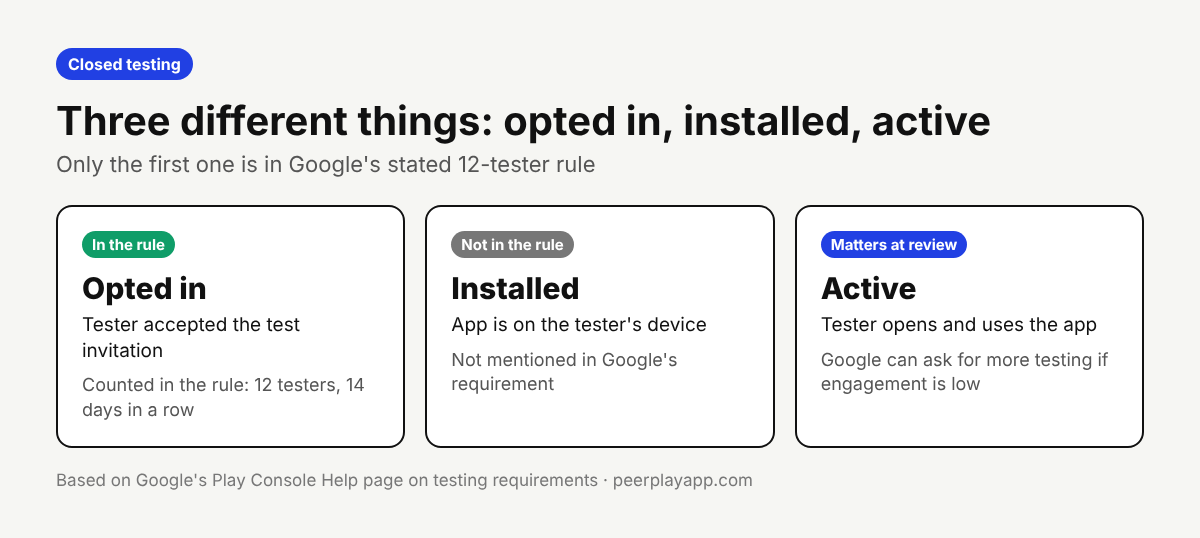
If a tester uninstalls your app in the middle of your 14-day closed test, they most likely still count toward the 12 testers, as long as they stay opted in. Google's requirement is written around testers who are opted in continuously for 14 days. It says nothing about the app staying installed.
That's the reassuring half. The other half is that an uninstall is usually the first sign of a tester who is about to leave, and Google can also ask for more testing when engagement is low. Here's what the rule says, what it leaves out, and what to do the same day.
What Google's rule actually counts
Google's help page for new personal accounts says you must run a closed test with a minimum of 12 testers who have been opted in continuously for at least 14 days. When you apply for production access, at least 12 testers must be opted in, and they must have been opted in for the preceding 14 days.
Opting in means accepting the test invitation with a Google account. It's a separate step from installing the app, and a different thing from using it. The page doesn't mention uninstalling anywhere, so nobody outside Google can tell you for certain how an uninstall is treated. What we can say is that the written rule is about opt-in status, and uninstalling doesn't opt a tester out.
Uninstalling versus leaving the test
Leaving the test is the action that clearly hurts you. Google says testers who opt in, test for fewer than 14 days and then opt out do not count toward the requirement.
Coming back doesn't repair it either. If a tester opts out and opts back in later, Google says the 14 days must be consecutive to count, so that tester starts again from the day they rejoined.
A tester can leave in a few ways: with the leave option on the testing page or in Google Play, by leaving the Google Group you used for the test, or when you remove their email from your tester list. If you manage testers through a group, tell people not to leave it until you have production access.
What happens if you drop below 12
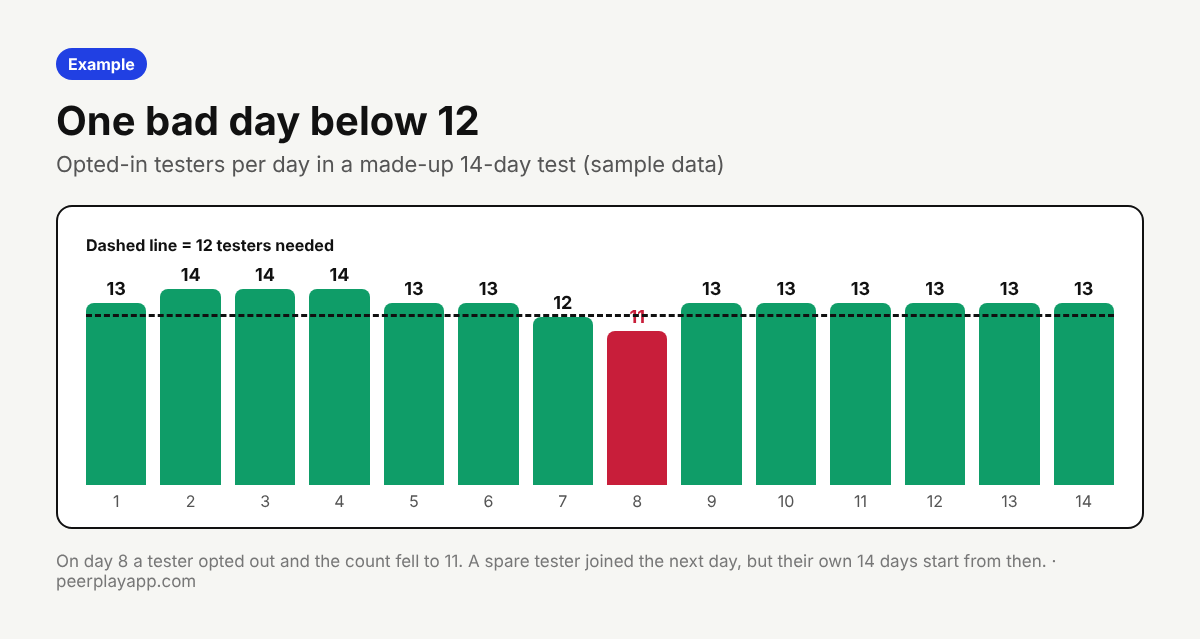
Your tester count only protects you while it stays at 12 or more. Google lists having fewer than 12 opted-in testers as a reason it may require continued testing.
This is why one tester leaving on day 8 can cost far more than one day. A replacement can join immediately, but their own 14 consecutive days start when they opt in. If that replacement is your twelfth tester, you wait for them.
The fix is a buffer. Start with 15 to 20 testers, not exactly 12, so one or two people leaving never takes you under the line.
Why an uninstall still matters
Even if an uninstall doesn't change the count, it changes the quality of your test. Google names insufficient tester engagement during the testing period as the other reason it may ask you to keep testing.
The production access application asks whether testers used all of your app's features, whether their usage matched what you expect from real users, and what feedback they gave. A tester who uninstalled on day 3 gives you nothing for any of those answers.
In PeerPlay's first paid campaign, 18 testers joined, 11 completed all 14 days and 3 quit. From the second day on, at least 12 were active every day for two weeks, and that only held because the group was larger than 12. Drop-off is normal, so plan for it.
What to do when a tester uninstalls
Ask why, the same day. An uninstall in a closed test is often a bug report nobody wrote down: a crash on start, a login that fails, an app too large for the phone. That reason is real feedback you can fix and mention in your application.
Ask them to stay opted in and reinstall. Most testers don't know that leaving the test resets their days, so say it plainly.
Line up a replacement now, not on day 13. If the tester has gone quiet for two or three days, treat them as gone and add a spare.
Check Play Console daily. Your closed testing track shows the number of opted-in testers, and the Dashboard shows your progress toward the requirement. A drop you notice on the same day is much cheaper than one you find in week two.
Keep the count safe for all 14 days
Uninstalls are hard to see from the outside. Play Console doesn't notify you when a single tester removes your app. What you can track is whether each tester still opens it.
That's how PeerPlay works. A test day counts when the tester starts your app from PeerPlay and keeps it open for at least 30 seconds, so a tester who uninstalled shows up as inactive that day and can be replaced. It's a free way to swap tests with other Android developers, with paid VIP packages if you'd rather skip the swaps.
FAQ
Does an uninstall reset the 14 days?
Google's rule is about testers staying opted in for 14 days in a row, and it doesn't mention uninstalls. An uninstall alone shouldn't reset anything, but Google doesn't spell this out, so ask the tester to reinstall and stay opted in.
Can a tester leave and rejoin the test?
They can, but Google says the 14 days must be consecutive. A tester who opts out and back in starts counting again from the day they rejoined.
What if I have fewer than 12 testers on one day?
Google lists fewer than 12 opted-in testers as a reason to require continued testing. Add a replacement right away and expect to wait until 12 testers have each been opted in for 14 days in a row.
How can I see which tester uninstalled my app?
Play Console shows totals, not a per-tester uninstall alert. Ask testers directly, or use a tool that records whether each tester opened the app that day.