 PeerPlay
The email finally arrives: your app has production access. After two weeks of chasing testers, most developers want to hit Publish right away and celebrate.
Wait one hour. The first production release behaves differently from the closed test you just finished, and a few settings are much easier to get right before launch than after. Here is the release and monitor checklist, split into before you publish, launch week and your first update.
New to the rule? Start with the full guide: 12 testers for 14 days on Google Play, step by step.
Why the first production release is different
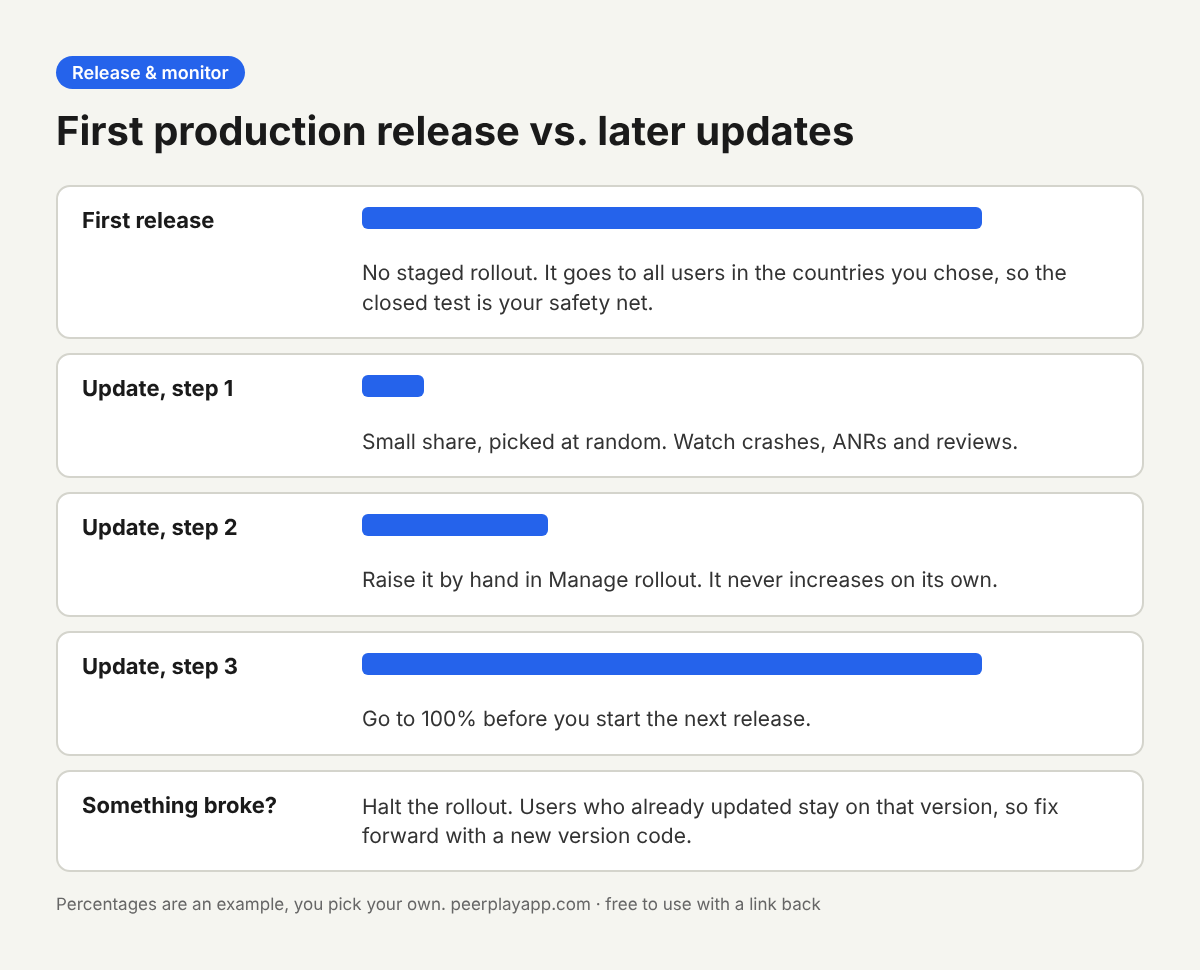
Google's help page on staged rollouts says they can only be used for app updates, not when you publish an app for the first time. So your first production release goes to all users in the countries you selected, at once. There is no 5% test group.
That is why the closed test matters beyond the 12 testers rule. It was your only chance to see the app on real phones before strangers do. If testers reported crashes, fix them before production, not after.
Before you publish: a 6-point checklist
1. Countries. Pick only the countries you can support. Once a staged rollout has started you can't remove countries from it, so get the list right early.
2. Managed publishing. In the Publishing overview, turn it on if you want control over the moment the app goes live. With it, approved changes wait until you click publish, so your launch doesn't land at 3 a.m.
3. Release notes. They are limited to 500 characters per language. Write them for users, not for reviewers.
4. Pre-launch report. If your closed test build produced one, read it again. Fix crashes and accessibility errors first; warnings can wait.
5. Store listing. Screenshots, short description and the privacy policy link should match the build you ship.
6. Version code. Production needs a new bundle or one already on a testing track. Promoting the tested build is the safest option, because it is exactly what your testers used.
How long production review takes
Google doesn't publish a fixed review time. Its release guide says to plan for review and notes that some categories of apps can take longer. Many developers see a few days for the first production release, but don't plan a launch date around an exact number.
If the review takes longer than a week, check the Publishing overview and your email for policy messages before you change anything. Re-submitting the same build rarely speeds things up.
Launch week: what to monitor
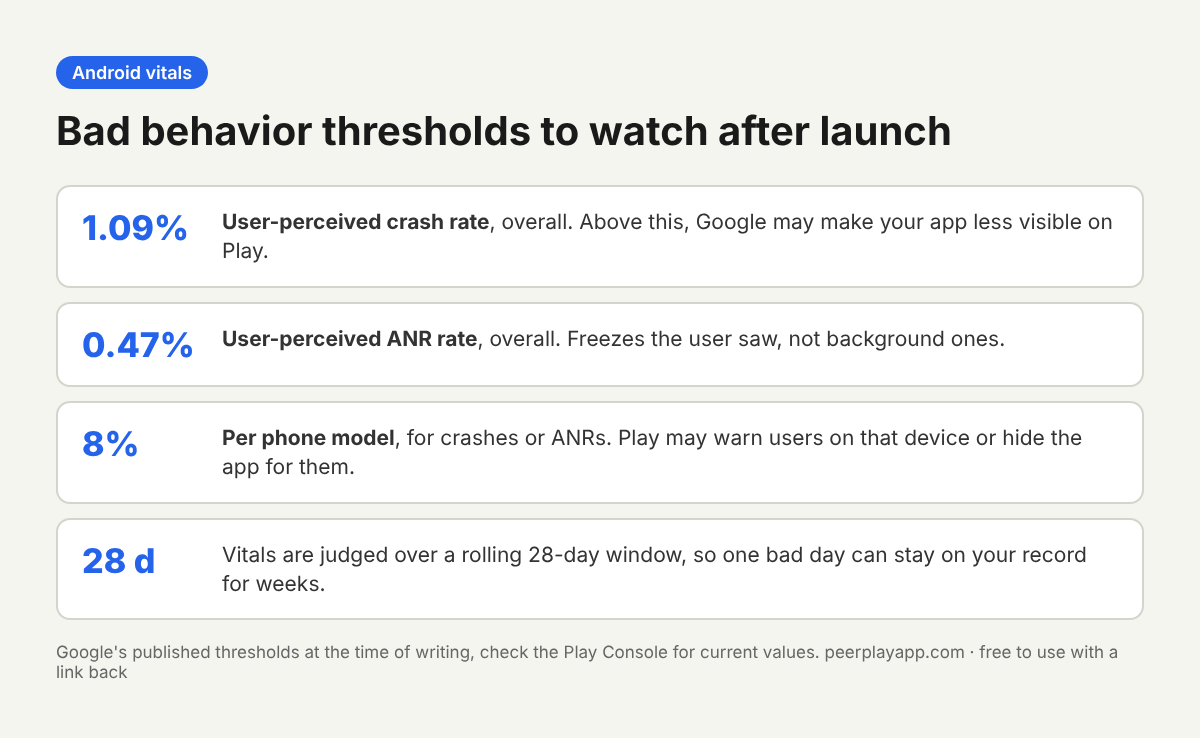
Android vitals is the main dashboard. It tracks user-perceived crash rate and ANR rate, which only count problems the user actually saw. At the time of writing, Google's bad behavior thresholds are 1.09% for crashes and 0.47% for ANRs overall, and 8% on any single phone model. Above them, Google says your app can become less visible on Play, and users on a bad device may see a warning.
Vitals look at a rolling 28 days, so a bad launch week stays on your record for a while. In the first days, check crashes and ANRs grouped by device and Android version. One cheap phone model with an old Android version is often the whole problem.
Reviews are the other signal. Reply to every early review, especially the angry ones. A short, specific reply (what you fixed and in which version) helps the next reader decide.
Your first update: use a staged rollout
From the second release on, you can roll out to a percentage of users. Google picks them at random for each release, and the percentage never rises on its own; you raise it in Manage rollout. A common pattern is a small share first, a larger one after a day or two of clean vitals, then 100%.
If something breaks, halt the rollout. No new users get that version, but users who already updated stay on it. Google's answer is to fix forward: build a new bundle with a higher version code and roll that out. Also note that you can't create a new release while a staged rollout is still open, so finish or remove it first.
Keep your closed testing track
Production access doesn't close your testing tracks. Keep the closed test and push risky builds there first, so a few real people see a change before your users do. It is the cheapest early warning you have.
If your testers drifted away after the 14 days, you can find new ones the same way. PeerPlay is a free Android app where developers test each other's apps, so you keep a small group of real testers while you help theirs.
FAQ
Can I use a staged rollout for my first production release?
No. Google says staged rollouts only work for app updates. Your first production release goes to all users in the countries you selected.
How long does Google Play production review take?
Google doesn't publish a fixed time and says some app categories can take longer. Plan for several days and use managed publishing to control the launch moment.
What are the Android vitals bad behavior thresholds?
At the time of writing, 1.09% user-perceived crash rate and 0.47% user-perceived ANR rate overall, and 8% for either on a single device model. Check the Play Console for current values.
Can I roll back an update on Google Play?
You can halt a staged rollout so no new users get it, but users who already updated stay on that version. The fix is a new release with a higher version code.
Should I keep my closed testing track after production access?
Yes. Testing tracks stay available, and sending new builds to testers first catches problems before your production users see them.