 PeerPlay
Your closed testing release is almost ready, and Play Console still shows an unfinished task in App content: Content rating. It looks like a long form about violence and gambling, and for a to-do app or a small utility that feels odd. Many first-time developers rush it, pick answers that look safe, and move on.
That's a mistake worth avoiding. The questionnaire takes a few minutes if you know what it wants, and a wrong answer can cost you far more time later. Here is how it works, in the order you'll meet it.
New to the rule? Start with the full guide: 12 testers for 14 days on Google Play, step by step.
Where to find the content rating questionnaire
In Play Console, open your app and go to Policy, then App content (Google's help page uses this path, but menu names can move between Console versions). Find Content rating and click Start.
Before you get there, it helps to finish the other App content tasks. Google lists a privacy policy, the ads declaration and app access instructions as things to have in place before the target audience and content section. Doing them first means you won't bounce between pages halfway through.
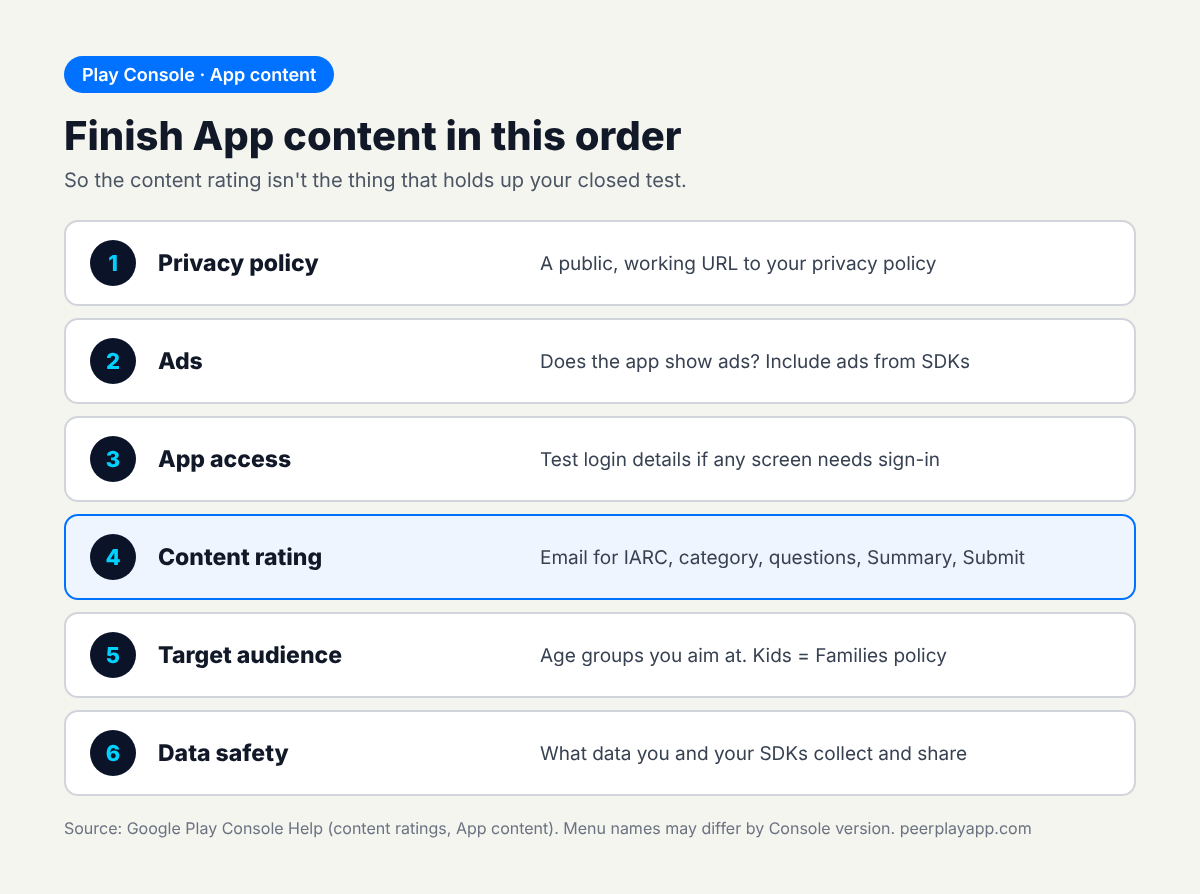
How to fill in the questionnaire, step by step
Step one is an email address. Google says it is used for correspondence with IARC, the International Age Rating Coalition, which issues the ratings. Use an inbox you actually read, because rating certificates and any refusal notices go there.
Step two is the category. Choose the one that describes your app's main purpose, for example a game, a social or communication app, or a reference and utility app. The category decides which questions come next.
Step three is the questions themselves. They ask about the content a user can meet in your app: things like violence, sexual content, crude language, drugs, alcohol and tobacco, and gambling or simulated gambling. Depending on the category, you may also be asked whether users can talk to each other, share content, or share their location, and whether the app sells digital goods.
Answer for what is in the app, including content users can create or see from other users. Google's page says the rating covers the content within your app and not things like consumer agreements or ads. You can save a draft and come back, but only one draft questionnaire per app at a time.
Step four is the Summary page. It shows the ratings calculated for each region. Read them before you click Submit. If a rating looks too high or too low, go back with Edit and check the answer that caused it.
One set of answers, many rating authorities
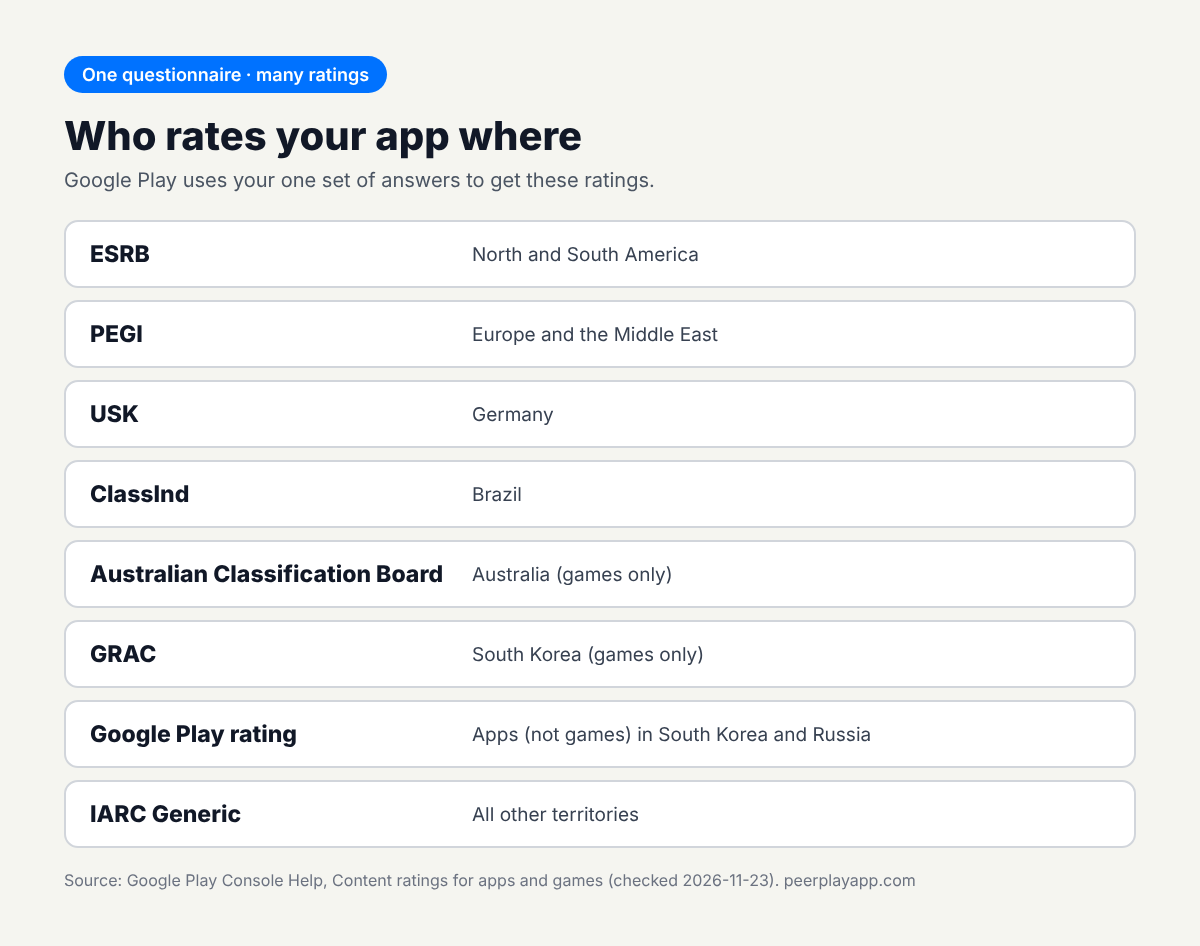
You answer once, and IARC turns those answers into ratings for several systems. Google lists ESRB for the Americas, PEGI for Europe and the Middle East, USK for Germany, ClassInd for Brazil, the Australian Classification Board and GRAC in South Korea for games, a Google Play rating for apps in South Korea and Russia, and the IARC generic rating for other territories.
That's why the same app can be rated differently in different countries. It isn't an error. Each authority applies its own rules to the same answers.
What happens if you skip it or answer wrong
Google's content ratings policy is direct: apps without a content rating will be removed from the Play Store. So it isn't optional, even for a closed test that only 12 people will see.
Wrong answers carry their own risk. Google says misrepresenting your app's content may result in removal or suspension, and rating authorities can review an app and change its rating. If an authority refuses to classify the app, IARC emails you, Play Console shows Refused classification, and the app is removed in that territory only. The certificate email has a link if you want to appeal.
There is also a quieter rule: ads must not be much more mature than your app's rating. A kids-friendly rating with ads for adult content is a policy problem even when your own screens are clean.
When to submit the questionnaire again
The rating belongs to the app, not to one release. Google says to submit a new questionnaire when changes to your app's content or features affect your answers. Adding chat between users, a store with digital goods, or a mini game with prizes are typical examples.
To redo it, open the Content rating page and click Start new questionnaire. A text change or a bug fix doesn't need a new rating.
Keep in mind that content rating and target audience are two separate declarations on the same page. The rating describes what is in the app. Target audience is the age groups you're aiming at, and picking children triggers Families policy rules on top of the rating.
Does the content rating affect closed testing?
Google's pages don't spell out exactly when the rating becomes required on each testing track. In practice, finish all App content tasks before you send your first closed testing release for review, so nothing holds it up. Your 14 days only start counting once testers are opted in and the build is available to them.
Once the release is live, you still need 12 opted-in testers for 14 days in a row. If you don't have them yet, PeerPlay is a free Android app where developers test each other's apps, so you can find your testers while you test theirs.
FAQ
Where is the content rating questionnaire in Play Console?
Open your app, then Policy, then App content, and find Content rating. Menu names can change between Console versions, so search for App content if the path differs.
Is the content rating questionnaire required for closed testing?
Google says apps without a content rating are removed from the Play Store and doesn't make an exception for testing. Finish it before your first closed testing release goes to review.
Why is my app rated differently in different countries?
One questionnaire produces ratings from several authorities, such as ESRB, PEGI, USK and ClassInd. Each applies its own rules to the same answers, so the age rating can differ by region.
Do I need a new content rating after every update?
No. Submit a new questionnaire only when content or features change in a way that affects your answers, for example adding user chat, gambling-style features or digital purchases.
What happens if I answer the content rating questionnaire wrong?
Google says misrepresenting content may lead to removal or suspension, and authorities can change your rating after review. Start a new questionnaire to correct your answers.