 PeerPlay
Your app only lets people pick a profile photo, yet Google Play rejects it: "Permission use is not directly related to your app's core purpose." The review points at READ_MEDIA_IMAGES or READ_MEDIA_VIDEO, two permissions you may not even remember adding.
This rejection is common on first releases and closed testing builds, and it often comes from a library rather than your own code. Here is how to tell whether your app may keep the permissions, and how to remove them cleanly if it can't.
New to the rule? Start with the full guide: 12 testers for 14 days on Google Play, step by step.
Why Google Play restricts photo and video permissions
Google's Photo and Video Permissions policy applies to apps that target Android 13 (API 33) or higher. It says these apps may only request READ_MEDIA_IMAGES and READ_MEDIA_VIDEO if system pickers, like the Android photo picker, are not sufficient for the app's core functionality. Google's help page gave May 28, 2025 as the date for full compliance, so the rule is fully enforced now.
The reasoning is privacy. Broad media access lets an app read every photo and video on the phone. The photo picker gives the app only the files the user chooses, with no permission prompt at all.
Does your app qualify to keep READ_MEDIA_IMAGES?
Ask one question: does your app need to see all of the user's photos or videos to do its main job? A gallery app, a photo backup app or a file manager that organizes the whole media library usually qualifies. Google also exempts private and enterprise device management apps.
Most apps don't qualify. Picking an avatar, attaching a receipt, uploading a picture to a chat or a post, or adding one image to a note are all one-off picks. The photo picker covers them. Google's page also notes that building a custom picker doesn't qualify an app by itself.
If your app really qualifies, you keep the permissions and fill in the photo and video permissions declaration in Play Console, explaining why the picker isn't enough. If it doesn't, the fix is to remove the permissions, not to argue in the declaration.
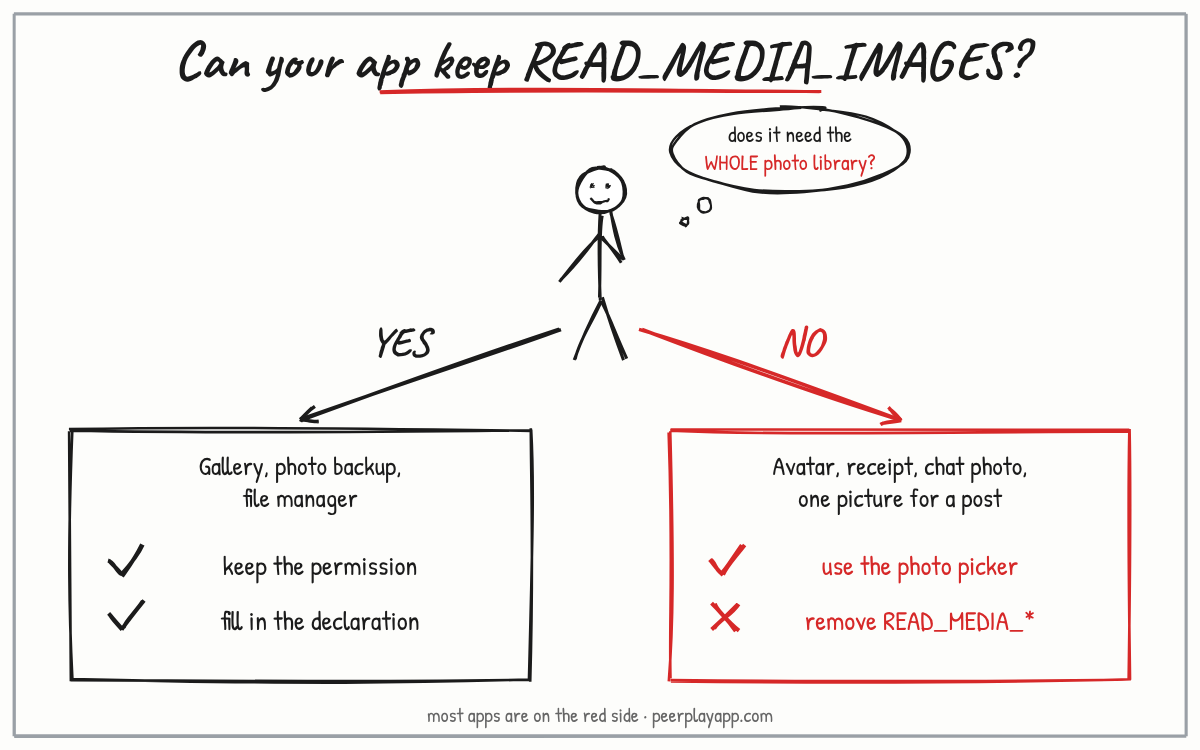
Switch to the Android photo picker
For native Android, use the PickVisualMedia or PickMultipleVisualMedia contract from androidx.activity. Google's page says the photo picker needs androidx.activity 1.7.0 or higher and is backported to Android 4.4 through 10, so it works on older phones too. You don't need any storage permission to use it.
You aren't forced to use the photo picker specifically. Google says other system pickers are fine as long as they meet your needs. In Flutter, Expo and other frameworks, check your image picking package's docs for photo picker support and update it to a current version. Older versions may still request broad media access.
If your app needs a camera, that is a separate permission. Taking a new photo with the camera doesn't require READ_MEDIA_IMAGES.
Remove READ_MEDIA_IMAGES that an SDK added
If the rejection survives your switch to the picker, a library is probably still adding the permission. Chat, support and media SDKs are common sources, and their manifest is merged into yours by default.
To drop it, add xmlns:tools="http://schemas.android.com/tools" to the manifest tag in app/src/main/AndroidManifest.xml, then add a uses-permission line for android.permission.READ_MEDIA_IMAGES with the attribute tools:node="remove". Do the same for android.permission.READ_MEDIA_VIDEO. Then open the Merged Manifest tab in Android Studio, or inspect the .aab with the APK Analyzer, and confirm that neither permission is left.
In no-code builders like Bubble or MIT App Inventor you often can't edit the manifest. Look for a media or permissions setting in the Android build options, and if there is none, ask the builder's support. Users on those forums report that rewording the permission prompt doesn't fix the rejection.
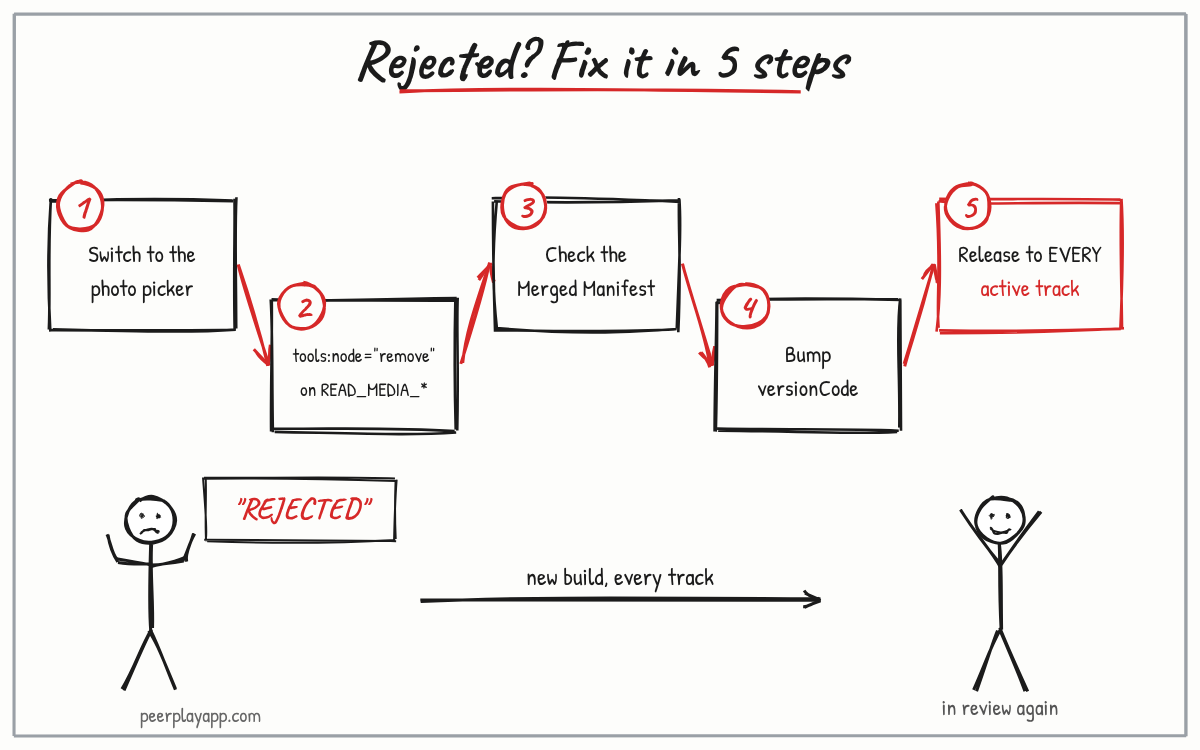
Re-upload and clear every active track
Bump versionCode, rebuild, and upload the new bundle. Then check your other tracks. If an older build with READ_MEDIA_IMAGES is still active on internal testing or closed testing, Play may keep flagging the app. Release the fixed build to every active track, or remove the old release.
If you removed the permissions completely, update the photo and video permissions declaration in Play Console to match, if the form is still shown for your app. The form and the bundle should tell the same story.
Fix it before your closed test starts
A policy rejection on your closed testing release means testers can't install the build yet, and the 14 days don't move while nobody can use it. Check your manifest for READ_MEDIA_IMAGES and READ_MEDIA_VIDEO before the first upload, not after the first rejection.
Once the release is through, you still need 12 opted-in testers for 14 days. If you don't have them yet, PeerPlay is a free Android app where developers test each other's apps, so you can find your testers while you test theirs.
FAQ
Why was my app rejected when it only picks a profile photo?
Because picking one photo doesn't need broad media access. Google expects such apps to use the photo picker and remove READ_MEDIA_IMAGES and READ_MEDIA_VIDEO from the manifest.
I never added READ_MEDIA_IMAGES. Where does it come from?
Usually from a library whose manifest is merged into yours. Check the Merged Manifest tab in Android Studio to see which one, then remove it with tools:node="remove".
Does the photo picker need a permission?
No. The Android photo picker returns only the files the user picks, so the app doesn't need READ_MEDIA_IMAGES or READ_MEDIA_VIDEO to use it.
Does this rejection reset my 14-day closed test?
An update by itself doesn't reset the 14 days. But if the rejection blocks your first closed testing release, testers can't install the app and the test starts later.