 PeerPlay
You raised targetSdk to 34 or higher, uploaded a build for closed testing, and Play Console now asks for a foreground service permissions declaration, with a video. Or worse, your release came back rejected with a line like "Your in-app experience or video does not match" the use case in your declaration.
This form is new to many indie developers, and the video part trips up most of them. Here is what Google asks for, how to shrink what you need to declare, and how to make the video pass.
New to the rule? Start with the full guide: 12 testers for 14 days on Google Play, step by step.
Why Play Console asks about foreground services
A foreground service is work that keeps running while the user sees a notification, like music playback, navigation or a large upload. Since Android 14 (API 34), every foreground service must name its type in the manifest, such as dataSync, location or mediaPlayback, and request the matching permission, like FOREGROUND_SERVICE_DATA_SYNC. Android's docs say a missing type throws MissingForegroundServiceTypeException, and a missing permission throws SecurityException.
Google Play adds a policy check on top. Apps targeting Android 14 or higher declare their foreground service types on the App content page in Play Console. Google's help page places it under Monitor and improve, then App content. Older docs call the menu Policy, then App content, so look for App content in either place.
What the foreground service declaration asks for
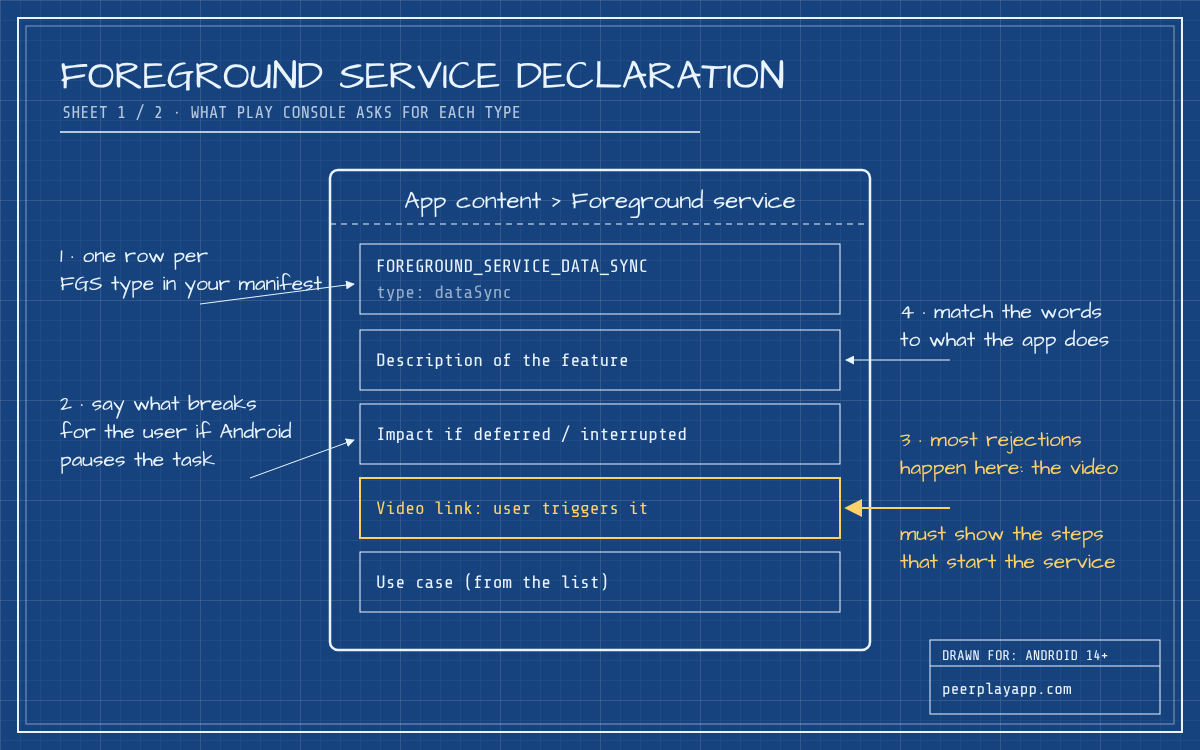
For each foreground service type in your bundle, Google's help page lists four things. A description of the feature that uses it. The impact on the user if the task is deferred or interrupted by the system. A use case, picked from a list or typed in. And a video link that shows the steps the user takes in your app to trigger the feature.
Think of each answer as one story told four times. The description says what the feature does, the impact says why it can't wait, the use case names it, and the video shows a real person starting it. If any of the four tell a different story, review can reject it.
First, check which foreground service types you really have
Open the Merged Manifest tab in Android Studio, or inspect your .aab with the APK Analyzer, and list every service with android:foregroundServiceType and every FOREGROUND_SERVICE_ permission. Libraries for media, location, calls, chat or background sync can bring their own services and permissions into your app.
If a type is there but your app never uses the feature behind it, remove it instead of declaring it. Use tools:node="remove" on the permission or the service in your own manifest, then check the merged manifest again. If the library needs that service to work, you have to keep it and declare it, or pick a different library.
Can a lighter API replace your foreground service?
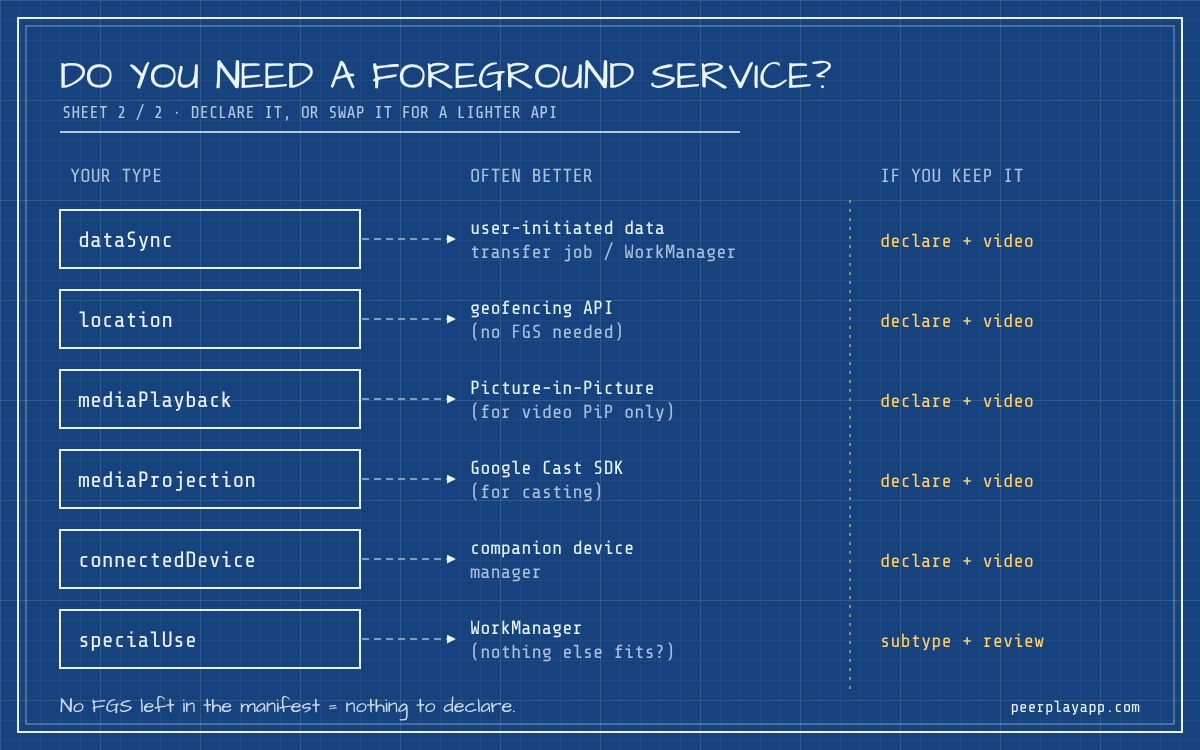
Often, yes. Android's docs recommend WorkManager or user-initiated data transfer jobs when no foreground service type fits. Google's Play help page goes further for dataSync: if the user explicitly asks for a network transfer, like uploading a file, a user-initiated data transfer job is the expected tool.
Google also lists swaps for other types. Geofencing instead of location for arrival alerts, Picture-in-Picture for video in a small window, the Google Cast SDK for casting, and the companion device manager for paired devices. Each swap removes a row from your declaration. And with no foreground service left in the manifest, there is nothing to declare.
specialUse is a special case. Android requires a PROPERTY_SPECIAL_USE_FGS_SUBTYPE property in the manifest that explains the use in your own words, and Google says the type is meant for limited scenarios that are reviewed at submission.
How to record a foreground service video that passes
Record on a real phone with a screen recorder, from opening the app to the moment the foreground service starts. Show the tap that starts the feature, then pull down the notification shade so the reviewer sees the foreground service notification. Keep it short and skip intros or music.
Upload it somewhere a reviewer can open without signing in, such as an unlisted YouTube video, and test the link in a private browser window. Use the same words in your description as the screens in the video. If the declaration says "user uploads a backup", the video should show a user uploading a backup, not a settings screen.
If a declaration that passed before is suddenly rejected, re-record the video on your current build. Screens change between versions. If the video already matches and it keeps happening, the appeal route in Play Console is the next step, as developers in Google's community forum have reported.
Don't let the declaration delay your closed test
The declaration is checked when you send a release for review, closed testing included. Until that release is approved, your testers can't install the build, so the 14 days start later. Settle your foreground service types and record the video before you upload the first build.
Once the release is through, you still need 12 opted-in testers for 14 days in a row. If you don't have them yet, PeerPlay is a free Android app where developers test each other's apps, so you can find your testers while you test theirs.
FAQ
What should the foreground service video show?
The steps a user takes in your app to start the feature that uses the foreground service, ending with the foreground service notification visible. It should match the description and use case you declared.
Can I avoid the foreground service declaration?
Yes, if no foreground service types are left in your merged manifest. Remove types your app doesn't use and move work to WorkManager or a user-initiated data transfer job where that fits.
Which type do I need for uploading files?
Google's help page points apps that transfer data at the user's explicit request to a user-initiated data transfer job rather than a dataSync foreground service.
Does the declaration apply to closed testing releases?
It's checked when you send a release for review, closed testing included. A rejected declaration means testers can't install the build yet, so your 14 days start later.